Structural Packaging Design & 3D Workflow
Introduction
Packaging design teams face persistent challenges in translating 2D dielines into production-ready 3D structures without physical prototyping. Esko ArtiosCAD addresses this workflow gap by providing a dedicated CAD environment for structural design, virtual prototyping, and manufacturing output for corrugated, folding carton, and point-of-purchase (POP) displays . Version 26.03 adds resizable design templates, updated 3D handles, and enhanced SolidWorks 2026 import/export to streamline the transition from concept to production . This review evaluates ArtiosCAD's mechanisms, system footprint, and integration capabilities for enterprise environments, focusing on objective performance and infrastructure requirements .
Core Architecture and Functional Mechanisms
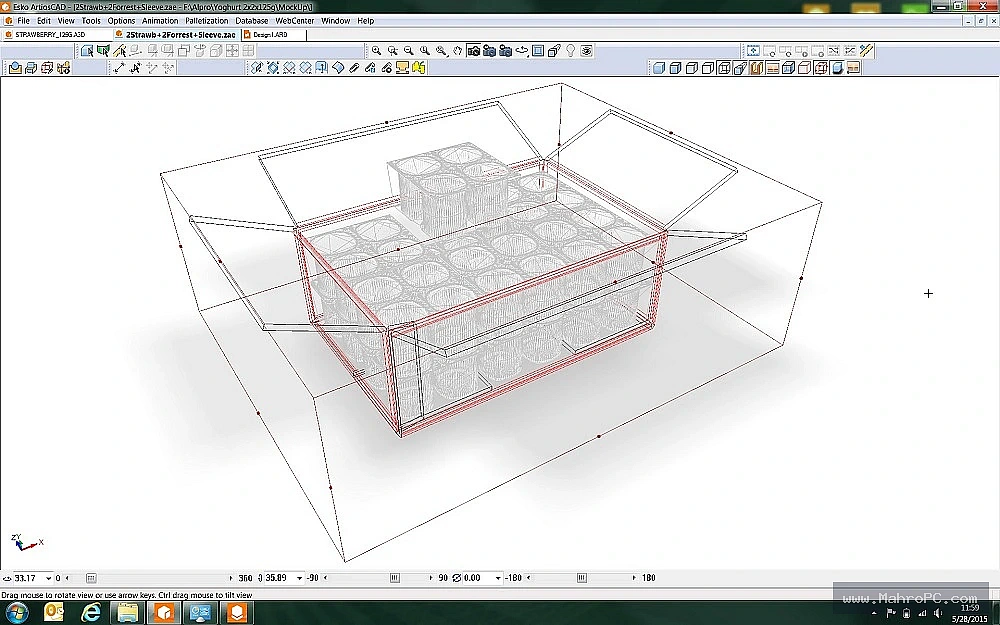
ArtiosCAD operates as a parametric CAD platform engineered to maintain bidirectional links between 2D structural designs and their 3D representations . The software processes geometric data through a rebuildable design engine, allowing modifications to parameters that automatically propagate across the associated design files and library standards (FEFCO, ECMA) . For production routing, ArtiosCAD integrates with Esko's workflow ecosystem to manage data handoff to cutting tables and printing systems . The 3D visualization module utilizes a dedicated rendering pipeline to simulate folds, tucks, and assembly fitments, which reduces the need for physical samples .
Pros & Cons
Pros:
-
Parametric rebuildable design library reduces manual redraw time by up to 75% on standardized structures .
-
3D structural validation provides early detection of assembly or material constraint errors before production .
-
Native integration with Adobe Illustrator maintains data integrity between structural and graphic design .
-
Includes ArtiosCAD Preflight tool to identify potential die-cutting or manufacturing issues .
Cons:
-
Significant learning curve due to CAD-style workflow and packaging-specific terminology .
-
High total cost of ownership associated with enterprise licensing .
-
Collaboration features depend on Esko's WebCenter, limiting standalone sharing capabilities .
Key Technical Capabilities Analyzed
2D Structural Design & Library
The software includes a comprehensive library of resizable standards for corrugated and folding cartons . The "Rebuild" feature enables engineers to parametrically modify design dimensions and geometry, drastically reducing time spent on design variations .
3D Virtual Prototyping
ArtiosCAD folds 2D structures into accurate 3D models to validate fit, form, and function . This functionality supports the creation of assembly videos and animation movies for communication with production teams or clients without requiring physical samples .
Production Handoff & Automation
The platform ensures accurate data transfer to manufacturing equipment . It includes tools for generating nesting layouts, ejection rubber profiles, and die-board specifications, directly linking design data to production KPIs to reduce setup times and material waste .
Interoperability & Integration
ArtiosCAD supports importing 3D product models from various formats, including SolidWorks, ProE, and STEP . It integrates with palletization software (Cape Pack) to analyze case sizes and optimize pallet patterns, linking structural design with logistics efficiency .
You may also like :: Print Artist Platinum 2026
Enterprise Infrastructure & Optimization Guide
ArtiosCAD requires high read/write IOPS, particularly when accessing network libraries or processing large 3D assemblies. Local NVMe storage is recommended for the working directory, with SSDs for the library . Network configuration must permit communication on standard ports (HTTPS/443) for license validation and WebCenter integration. Active directory/GPO policies should exclude the ArtiosCAD temp directory and associated file types (*.ARD, *.ARC) from real-time antivirus scanning. For stability, graphics drivers must be certified for OpenGL. Memory allocation should be prioritized to the application process via OS settings.
Hardware & System Requirements
| Component | Minimum Configuration | Recommended Enterprise Specification |
|---|---|---|
| OS | Windows 10 Pro (64-bit) | Windows 11 Pro for Workstations |
| Processor | Intel Core i5 (6th Gen) or equivalent | Intel Xeon / Core i7 (12th Gen) or higher |
| RAM | 16 GB (for basic designs) | 32 GB (or 64 GB for complex assemblies) |
| Graphics | Dedicated GPU with 2GB VRAM, OpenGL support | NVIDIA Quadro RTX or equivalent (4GB+ VRAM) |
| Storage | 3 GB for installation + 10 GB workspace | NVMe SSD (1TB) for OS and project files |
Operational Decision Matrix (Verdict)
-
Deploy If: The organization handles high-volume structural packaging design for corrugated or folding cartons and possesses the budget for enterprise licensing and dedicated training to leverage parametric modeling and reduce production errors .
-
Avoid If: The workflow involves only basic graphic design, the team lacks engineering/CAD experience, or budget constraints cannot accommodate specialized hardware and software licensing costs .
Frequently Asked Questions
Q: How does ArtiosCAD prevent manufacturing errors before production?
A: The integrated ArtiosCAD Preflight module uses patent-pending algorithms to analyze 2D structures and 3D assemblies for potential die-cutting inefficiencies, geometric conflicts, and material violations. Errors are flagged prior to handoff .
Q: What file formats are supported for 3D data exchange?
A: ArtiosCAD supports import and export of major CAD formats including STEP, IGES, SAT, SolidWorks 2026, ProE, and Collada. This facilitates accurate product-to-packaging fit analysis .
Q: Can ArtiosCAD be integrated into an existing automation workflow?
A: Yes. It is designed to operate within Esko's connected packaging ecosystem, allowing data to route to cutting tables and connecting to WebCenter for project management. It also integrates with Adobe Illustrator and Cape Pack .
Q: How does ArtiosCAD handle high-resolution 4K displays?
A: The 26.03 release includes improvements for high-resolution displays, ensuring clear UI rendering and precise cursor placement for design work on modern monitors